













































Remove Background
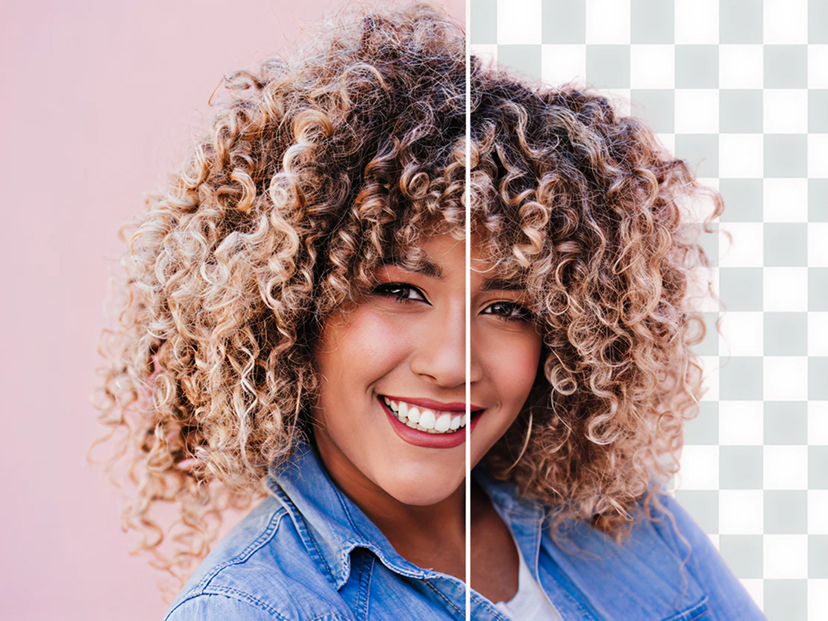
Your All-in-One AI Background Tool
100% Automatically and Free
Your all-in-one AI tool for effortlessly removing and transforming image backgrounds. Instantly cut out any subject and isolate it with exceptional precision.
But it doesn’t stop there. Our AI Background Generator lets you create stunning custom backdrops in seconds—no prompts, design skills, or complicated editing required.
Remove Background Online
Remove the background from any image in seconds with our free AI-powered background remover. Upload your image and let the tool automatically detect the main subject, separate it from the background, and create a clean, professional cutout.
No Photoshop, complicated editing software, or design experience is required. The process is simple, fast, and designed for anyone who needs a transparent or replacement background.
How to Remove an Image Background
- Upload your image
Select a JPG, PNG, or supported image file from your device. - Let AI remove the background
Our automated tool analyzes the image and identifies the main subject. - Preview the result
Check the cutout and make sure the subject is separated from the original background. - Create your new background
Use a transparent background or transform the image with a new custom backdrop.
What Can You Use It For?
Our background removal tool can be useful for many types of images, including:
- Product photos
- Profile pictures
- Portraits
- Social media graphics
- Website images
- Blog images
- Online stores
- Marketing materials
- Presentations
- Creative projects
Create a New Background
Removing the background is only the beginning. After isolating your subject, you can create a fresh background that fits your image and purpose. Give product photos a clean studio look, place a person in a different setting, or create a simple background for your website or social media content.
Why Use Our Background Remover?
Fast and simple — Remove backgrounds without complicated editing steps.
AI-powered — Automatically detects the subject and separates it from the surrounding background.
No design skills required — Upload your image and let the tool do the hard work.
Free to use — Get started without purchasing professional image-editing software.
Useful for many projects — Prepare images for websites, articles, social media, presentations, stores, and more.
Frequently Asked Questions
Is the background remover free?
Yes. You can use the background removal tool for free.
Do I need Photoshop?
No. The tool is designed to provide an easy alternative to manual background removal and complicated image-editing software.
What types of images can I remove backgrounds from?
You can use the tool with many common image types, including portraits, product photos, objects, and other images where you want to isolate the main subject.
Can I replace the removed background?
Yes. After removing the original background, you can use a transparent background or create a new backdrop for your image.
Do I need design experience?
No. The automated process is designed to make background removal accessible even if you have little or no experience with image editing.
Start Removing Your Background
Ready to create a clean image? Upload your photo above and let the AI automatically remove the background in just a few simple steps.